
What is a Preapproval? - Overview
The pre-approval workflow allows designated reviewers (for example, a shareholder’s legal department) to review and approve a resolution before it is sent for voting and signing.
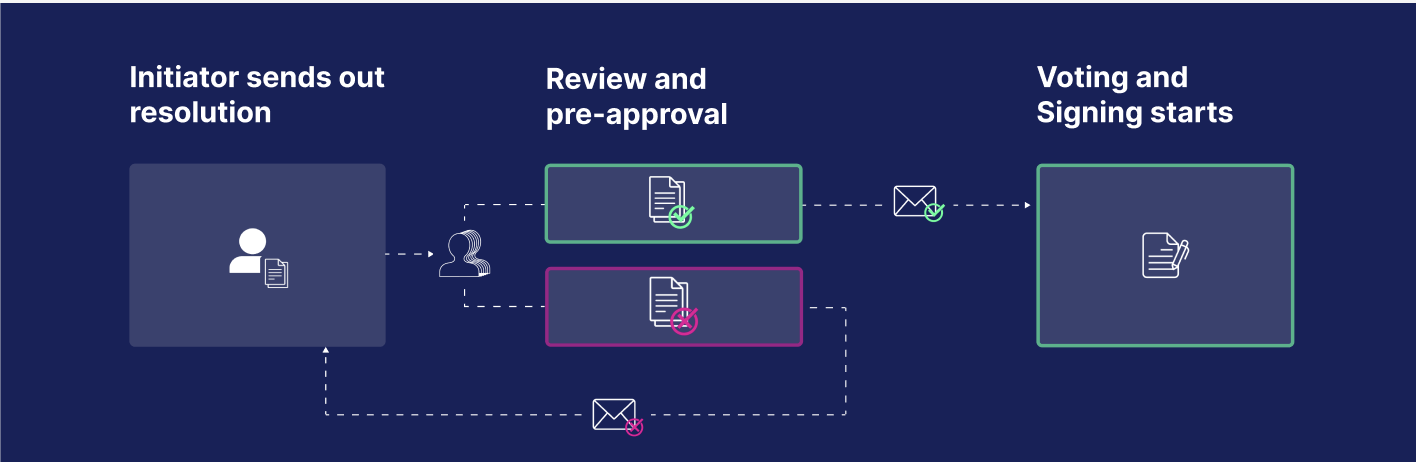
After creating a circular resolution, you have two options:
- Start the voting process immediately.
- Start the pre-approval process. In this case, the resolution remains in Approval status and is not yet sent for voting.
You can assign one or more pre-approvers to each shareholder. If pre-approvers are assigned to different shareholders, they cannot view each other’s names or decisions. For more information, see our Resolution Settings FAQ.
How the pre-approval process works
Pre-approvers receive an email notification containing a link to the resolution and its supporting documents. They can review the resolution and either approve or reject it. When rejecting a resolution, they can also provide comments explaining their decision.
If all pre-approvers approve
Once all pre-approvers have approved the resolution, its status changes to Approved. The resolution initiator is notified that the pre-approval process has been completed successfully.
If a pre-approver rejects
If any pre-approver rejects the resolution, the initiator is notified and can review the submitted comments. The initiator can then revise the resolution and restart the pre-approval process.
Only the initiator receives notifications about rejected pre-approvals and the accompanying comments.
Comments Function
Pre-approvers can add comments to explain their decision or provide additional feedback. This helps improve transparency and facilitates communication throughout the review process.
The pre-approval workflow ensures that resolutions are reviewed by the appropriate stakeholders before entering the formal voting and signing process.